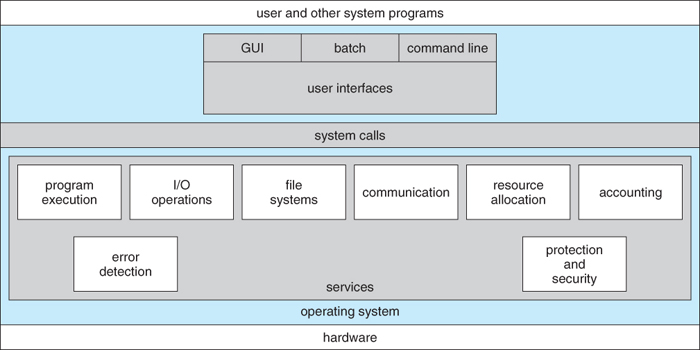
Figure 2.1 - A view of operating system services
This chapter deals with how operating systems are structured and organized. Different design issues and choices are examined and compared, and the basic structure of several popular OSes are presented.
Figure 2.1 - A view of operating system services
OSes provide environments in which programs run, and services for the users of the system, including:
Other systems aid in the efficient operation of the OS itself:
2.2.1 Command Interpreter
- Gets and processes the next user request, and launches the requested programs.
- In some systems the CI may be incorporated directly into the kernel.
- More commonly the CI is a separate program that launches once the user logs in or otherwise accesses the system.
- UNIX, for example, provides the user with a choice of different shells, which may either be configured to launch automatically at login, or which may be changed on the fly. ( Each of these shells uses a different configuration file of initial settings and commands that are executed upon startup. )
- Different shells provide different functionality, in terms of certain commands that are implemented directly by the shell without launching any external programs. Most provide at least a rudimentary command interpretation structure for use in shell script programming ( loops, decision constructs, variables, etc. )
- An interesting distinction is the processing of wild card file naming and I/O re-direction. On UNIX systems those details are handled by the shell, and the program which is launched sees only a list of filenames generated by the shell from the wild cards. On a DOS system, the wild cards are passed along to the programs, which can interpret the wild cards as the program sees fit.
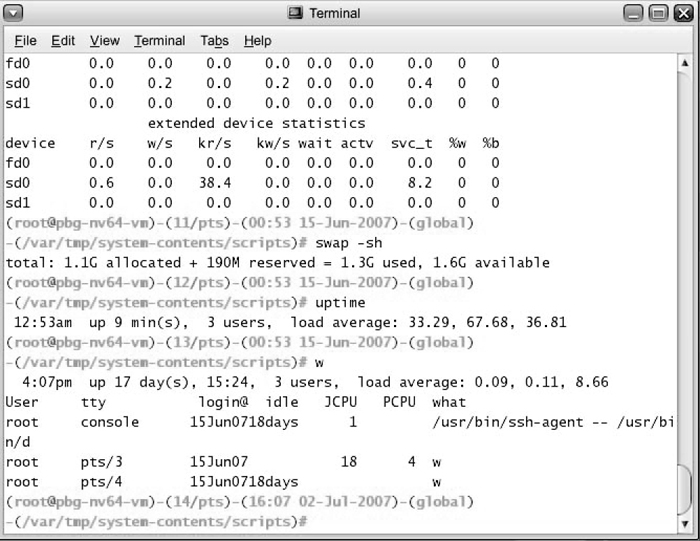
Figure 2.2 - The Bourne shell command interpreter in Solaris 102.2.2 Graphical User Interface, GUI
- Generally implemented as a desktop metaphor, with file folders, trash cans, and resource icons.
- Icons represent some item on the system, and respond accordingly when the icon is activated.
- First developed in the early 1970's at Xerox PARC research facility.
- In some systems the GUI is just a front end for activating a traditional command line interpreter running in the background. In others the GUI is a true graphical shell in its own right.
- Mac has traditionally provided ONLY the GUI interface. With the advent of OSX ( based partially on UNIX ), a command line interface has also become available.
- Because mice and keyboards are impractical for small mobile devices, these normally use a touch-screen interface today, that responds to various patterns of swipes or "gestures". When these first came out they often had a physical keyboard and/or a trackball of some kind built in, but today a virtual keyboard is more commonly implemented on the touch screen.
Figure 2.3 - The iPad touchscreen2.2.3 Choice of interface
- Most modern systems allow individual users to select their desired interface, and to customize its operation, as well as the ability to switch between different interfaces as needed. System administrators generally determine which interface a user starts with when they first log in.
- GUI interfaces usually provide an option for a terminal emulator window for entering command-line commands.
- Command-line commands can also be entered into shell scripts, which can then be run like any other programs.
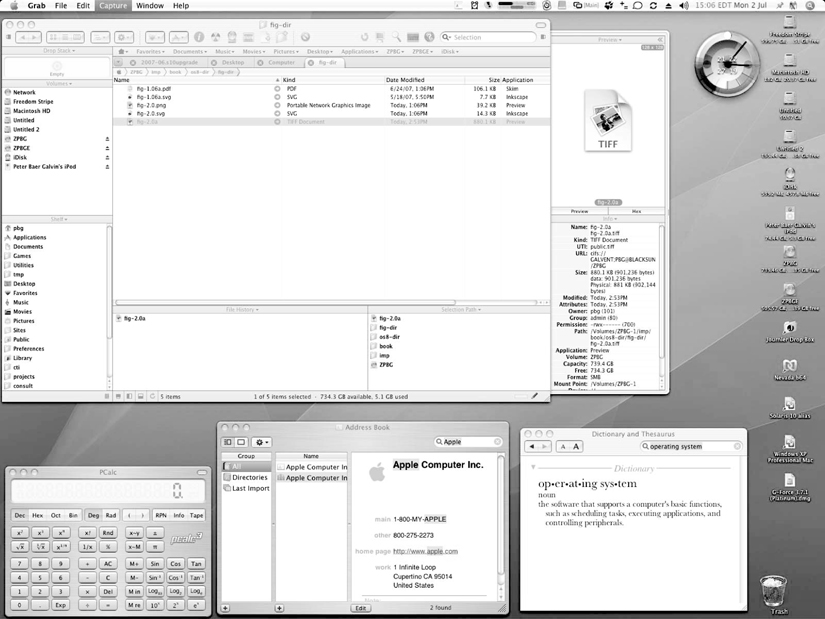
Figure 2.4 - The Mac OS X GUI
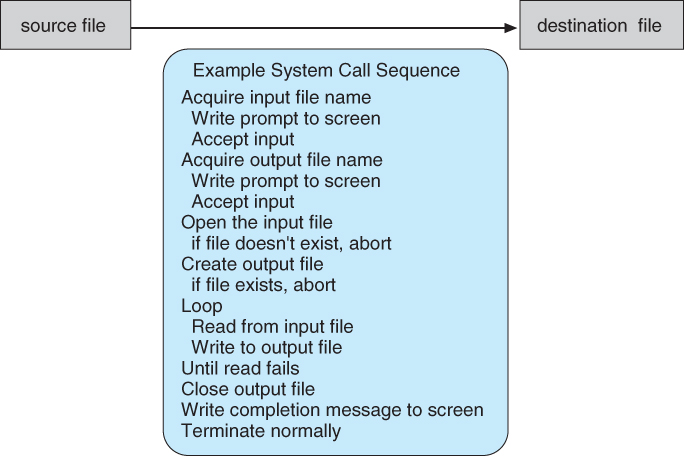
Figure 2.5 - Example of how system calls are used.
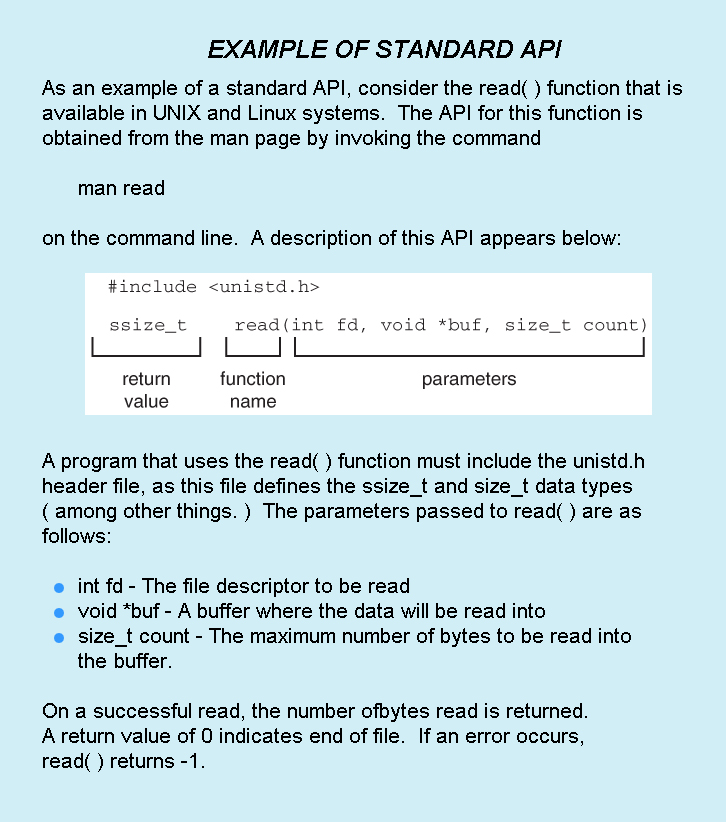
The use of APIs instead of direct system calls provides for greater program portability between different systems. The API then makes the appropriate system calls through the system call interface, using a table lookup to access specific numbered system calls, as shown in Figure 2.6:

Figure 2.6 - The handling of a user application invoking the open( ) system call
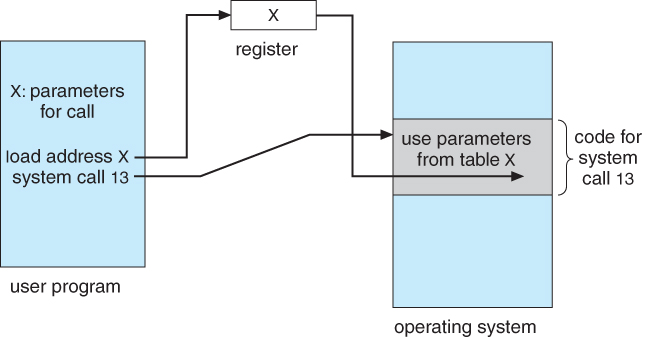
Figure 2.7 - Passing of parameters as a table
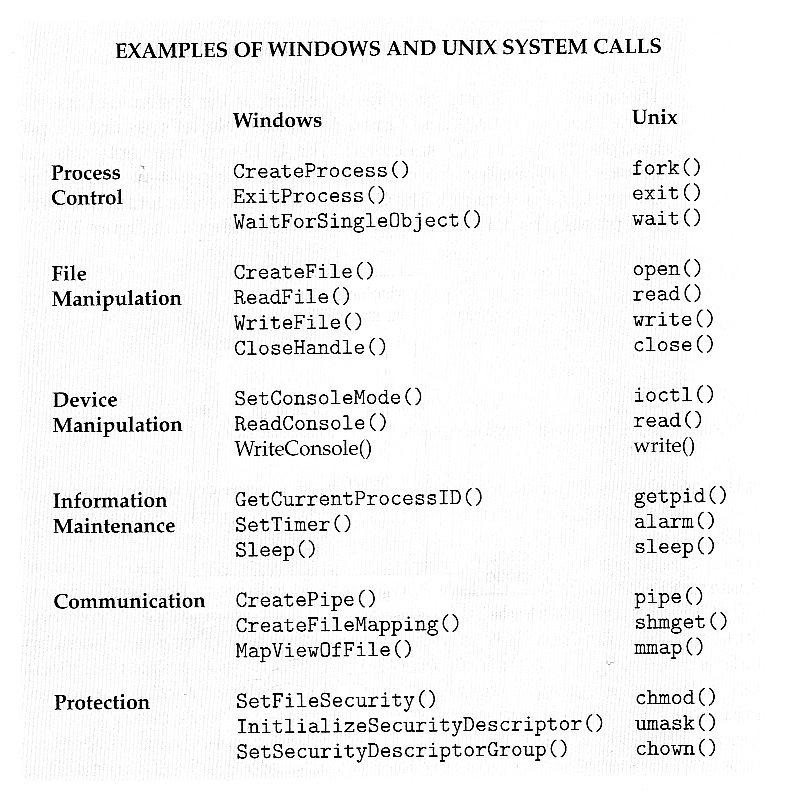
Six major categories, as outlined in Figure 2.8 and the following six subsections:
( Sixth type, protection, not shown here but described below. )
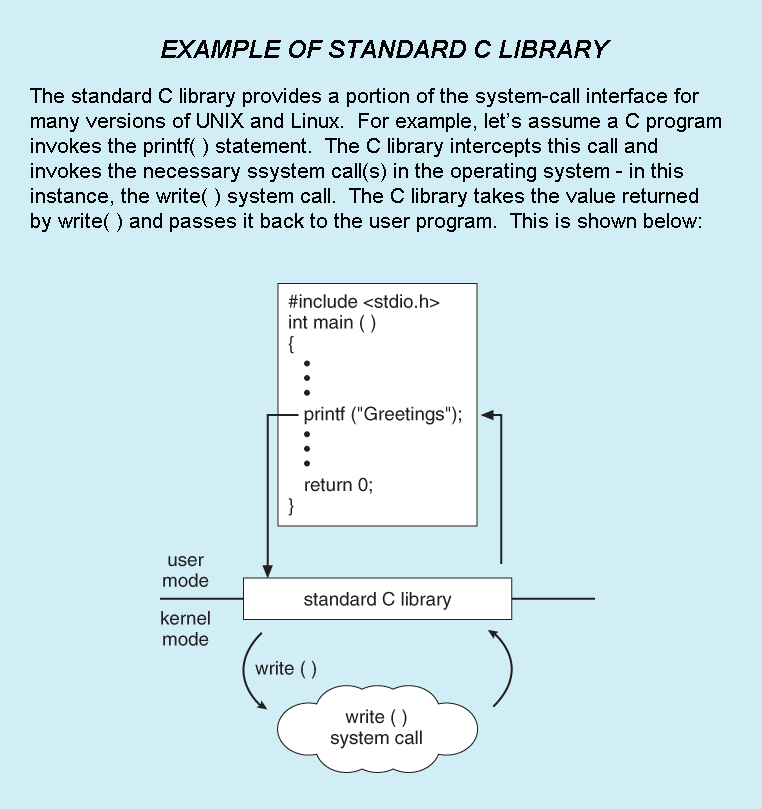
- Standard library calls may also generate system calls, as shown here:
2.4.1 Process Control
- Process control system calls include end, abort, load, execute, create process, terminate process, get/set process attributes, wait for time or event, signal event, and allocate and free memory.
- Processes must be created, launched, monitored, paused, resumed,and eventually stopped.
- When one process pauses or stops, then another must be launched or resumed
- When processes stop abnormally it may be necessary to provide core dumps and/or other diagnostic or recovery tools.
- Compare DOS ( a single-tasking system ) with UNIX ( a multi-tasking system ).
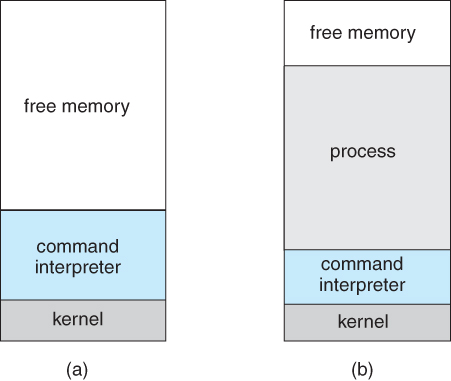
- When a process is launched in DOS, the command interpreter first unloads as much of itself as it can to free up memory, then loads the process and transfers control to it. The interpreter does not resume until the process has completed, as shown in Figure 2.9:
Figure 2.9 - MS-DOS execution. (a) At system startup. (b) Running a program.
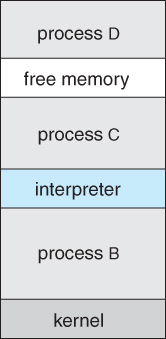
- Because UNIX is a multi-tasking system, the command interpreter remains completely resident when executing a process, as shown in Figure 2.11 below.
- The user can switch back to the command interpreter at any time, and can place the running process in the background even if it was not originally launched as a background process.
- In order to do this, the command interpreter first executes a "fork" system call, which creates a second process which is an exact duplicate ( clone ) of the original command interpreter. The original process is known as the parent, and the cloned process is known as the child, with its own unique process ID and parent ID.
- The child process then executes an "exec" system call, which replaces its code with that of the desired process.
- The parent ( command interpreter ) normally waits for the child to complete before issuing a new command prompt, but in some cases it can also issue a new prompt right away, without waiting for the child process to complete. ( The child is then said to be running "in the background", or "as a background process". )
Figure 2.10 - FreeBSD running multiple programs2.4.2 File Management
- File management system calls include create file, delete file, open, close, read, write, reposition, get file attributes, and set file attributes.
- These operations may also be supported for directories as well as ordinary files.
- ( The actual directory structure may be implemented using ordinary files on the file system, or through other means. Further details will be covered in chapters 11 and 12. )
2.4.3 Device Management
- Device management system calls include request device, release device, read, write, reposition, get/set device attributes, and logically attach or detach devices.
- Devices may be physical ( e.g. disk drives ), or virtual / abstract ( e.g. files, partitions, and RAM disks ).
- Some systems represent devices as special files in the file system, so that accessing the "file" calls upon the appropriate device drivers in the OS. See for example the /dev directory on any UNIX system.
2.4.4 Information Maintenance
- Information maintenance system calls include calls to get/set the time, date, system data, and process, file, or device attributes.
- Systems may also provide the ability to dump memory at any time, single step programs pausing execution after each instruction, and tracing the operation of programs, all of which can help to debug programs.
2.4.5 Communication
- Communication system calls create/delete communication connection, send/receive messages, transfer status information, and attach/detach remote devices.
- The message passing model must support calls to:
- Identify a remote process and/or host with which to communicate.
- Establish a connection between the two processes.
- Open and close the connection as needed.
- Transmit messages along the connection.
- Wait for incoming messages, in either a blocking or non-blocking state.
- Delete the connection when no longer needed.
- The shared memory model must support calls to:
- Create and access memory that is shared amongst processes ( and threads. )
- Provide locking mechanisms restricting simultaneous access.
- Free up shared memory and/or dynamically allocate it as needed.
- Message passing is simpler and easier, ( particularly for inter-computer communications ), and is generally appropriate for small amounts of data.
- Shared memory is faster, and is generally the better approach where large amounts of data are to be shared, ( particularly when most processes are reading the data rather than writing it, or at least when only one or a small number of processes need to change any given data item. )
2.4.6 Protection
- Protection provides mechanisms for controlling which users / processes have access to which system resources.
- System calls allow the access mechanisms to be adjusted as needed, and for non-priveleged users to be granted elevated access permissions under carefully controlled temporary circumstances.
- Once only of concern on multi-user systems, protection is now important on all systems, in the age of ubiquitous network connectivity.
2.6.1 Design Goals
- Requirements define properties which the finished system must have, and are a necessary first step in designing any large complex system.
- User requirements are features that users care about and understand, and are written in commonly understood vernacular. They generally do not include any implementation details, and are written similar to the product description one might find on a sales brochure or the outside of a shrink-wrapped box.
- System requirements are written for the developers, and include more details about implementation specifics, performance requirements, compatibility constraints, standards compliance, etc. These requirements serve as a "contract" between the customer and the developers, ( and between developers and subcontractors ), and can get quite detailed.
- Requirements for operating systems can vary greatly depending on the planned scope and usage of the system. ( Single user / multi-user, specialized system / general purpose, high/low security, performance needs, operating environment, etc. )
2.6.2 Mechanisms and Policies
- Policies determine what is to be done. Mechanisms determine how it is to be implemented.
- If properly separated and implemented, policy changes can be easily adjusted without re-writing the code, just by adjusting parameters or possibly loading new data / configuration files. For example the relative priority of background versus foreground tasks.
2.6.3 Implementation
- Traditionally OSes were written in assembly language. This provided direct control over hardware-related issues, but inextricably tied a particular OS to a particular HW platform.
- Recent advances in compiler efficiencies mean that most modern OSes are written in C, or more recently, C++. Critical sections of code are still written in assembly language, ( or written in C, compiled to assembly, and then fine-tuned and optimized by hand from there. )
- Operating systems may be developed using emulators of the target hardware, particularly if the real hardware is unavailable ( e.g. not built yet ), or not a suitable platform for development, ( e.g. smart phones, game consoles, or other similar devices. )
For efficient performance and implementation an OS should be partitioned into separate subsystems, each with carefully defined tasks, inputs, outputs, and performance characteristics. These subsystems can then be arranged in various architectural configurations:
2.7.1 Simple Structure
When DOS was originally written its developers had no idea how big and important it would eventually become. It was written by a few programmers in a relatively short amount of time, without the benefit of modern software engineering techniques, and then gradually grew over time to exceed its original expectations. It does not break the system into subsystems, and has no distinction between user and kernel modes, allowing all programs direct access to the underlying hardware. ( Note that user versus kernel mode was not supported by the 8088 chip set anyway, so that really wasn't an option back then. )
Figure 2.11 - MS-DOS layer structureThe original UNIX OS used a simple layered approach, but almost all the OS was in one big layer, not really breaking the OS down into layered subsystems:
Figure 2.12 - Traditional UNIX system structure2.7.2 Layered Approach
- Another approach is to break the OS into a number of smaller layers, each of which rests on the layer below it, and relies solely on the services provided by the next lower layer.
- This approach allows each layer to be developed and debugged independently, with the assumption that all lower layers have already been debugged and are trusted to deliver proper services.
- The problem is deciding what order in which to place the layers, as no layer can call upon the services of any higher layer, and so many chicken-and-egg situations may arise.
- Layered approaches can also be less efficient, as a request for service from a higher layer has to filter through all lower layers before it reaches the HW, possibly with significant processing at each step.
Figure 2.13 - A layered operating system2.7.3 Microkernels
- The basic idea behind micro kernels is to remove all non-essential services from the kernel, and implement them as system applications instead, thereby making the kernel as small and efficient as possible.
- Most microkernels provide basic process and memory management, and message passing between other services, and not much more.
- Security and protection can be enhanced, as most services are performed in user mode, not kernel mode.
- System expansion can also be easier, because it only involves adding more system applications, not rebuilding a new kernel.
- Mach was the first and most widely known microkernel, and now forms a major component of Mac OSX.
- Windows NT was originally microkernel, but suffered from performance problems relative to Windows 95. NT 4.0 improved performance by moving more services into the kernel, and now XP is back to being more monolithic.
- Another microkernel example is QNX, a real-time OS for embedded systems.
Figure 2.14 - Architecture of a typical microkernel2.7.4 Modules
- Modern OS development is object-oriented, with a relatively small core kernel and a set of modules which can be linked in dynamically. See for example the Solaris structure, as shown in Figure 2.13 below.
- Modules are similar to layers in that each subsystem has clearly defined tasks and interfaces, but any module is free to contact any other module, eliminating the problems of going through multiple intermediary layers, as well as the chicken-and-egg problems.
- The kernel is relatively small in this architecture, similar to microkernels, but the kernel does not have to implement message passing since modules are free to contact each other directly.
Figure 2.15 - Solaris loadable modules2.7.5 Hybrid Systems
- Most OSes today do not strictly adhere to one architecture, but are hybrids of several.
2.7.5.1 Mac OS X
- The Max OSX architecture relies on the Mach microkernel for basic system management services, and the BSD kernel for additional services. Application services and dynamically loadable modules ( kernel extensions ) provide the rest of the OS functionality:
Figure 2.16 - The Mac OS X structure2.7.5.2 iOS
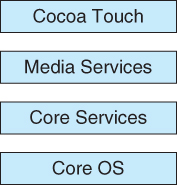
- The iOS operating system was developed by Apple for iPhones and iPads. It runs with less memory and computing power needs than Max OS X, and supports touchscreen interface and graphics for small screens:
Figure 2.17 - Architecture of Apple's iOS.2.7.5.3 Android
- The Android OS was developed for Android smartphones and tablets by the Open Handset Alliance, primarily Google.
- Android is an open-source OS, as opposed to iOS, which has lead to its popularity.
- Android includes versions of Linux and a Java virtual machine both optimized for small platforms.
- Android apps are developed using a special Java-for-Android development environment.
Figure 2.18 - Architecture of Google's Android
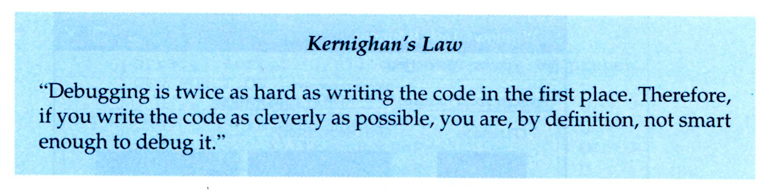
Kernighan's Law "Debugging is twice as hard as writing the code in the first place. Therefore, |
2.8.1 Failure Analysis
- Debuggers allow processes to be executed stepwise, and provide for the examination of variables and expressions as the execution progresses.
- Profilers can document program execution, to produce statistics on how much time was spent on different sections or even lines of code.
- If an ordinary process crashes, a memory dump of the state of that process's memory at the time of the crash can be saved to a disk file for later analysis.
- The program must be specially compiled to include debugging information, which may slow down its performance.
- These approaches don't really work well for OS code, for several reasons:
- The performance hit caused by adding the debugging ( tracing ) code would be unacceptable. ( Particularly if one tried to "single-step" the OS while people were trying to use it to get work done! )
- Many parts of the OS run in kernel mode, and make direct access to the hardware.
- If an error occurred during one of the kernel's file-access or direct disk-access routines, for example, then it would not be practical to try to write a crash dump into an ordinary file on the filesystem.
- Instead the kernel crash dump might be saved to a special unallocated portion of the disk reserved for that purpose.
2.8.2 Performance Tuning
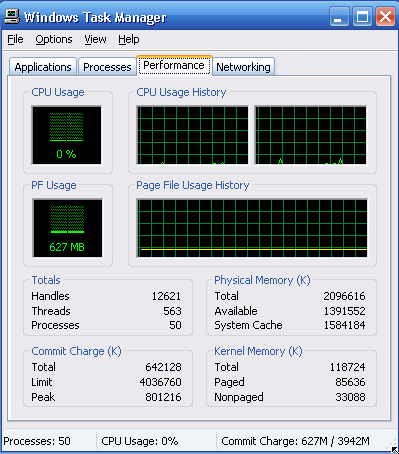
- Performance tuning ( debottlenecking ) requires monitoring system performance.
- One approach is for the system to record important events into log files, which can then be analyzed by other tools. These traces can also be used to evaluate how a proposed new system would perform under the same workload.
- Another approach is to provide utilities that will report system status upon demand, such as the unix "top" command. ( w, uptime, ps, etc. )
- System utilities may provide monitoring support.
Figure 2.19 - The Windows task manager.2.8.3 DTrace
- DTrace is a special facility for tracing a running OS, developed for Solaris 10.
- DTrace adds "probes" directly into the OS code, which can be queried by "probe consumers".
- Probes are removed when not in use, so the DTrace facility has zero impact on the system when not being used, and a proportional impact in use.
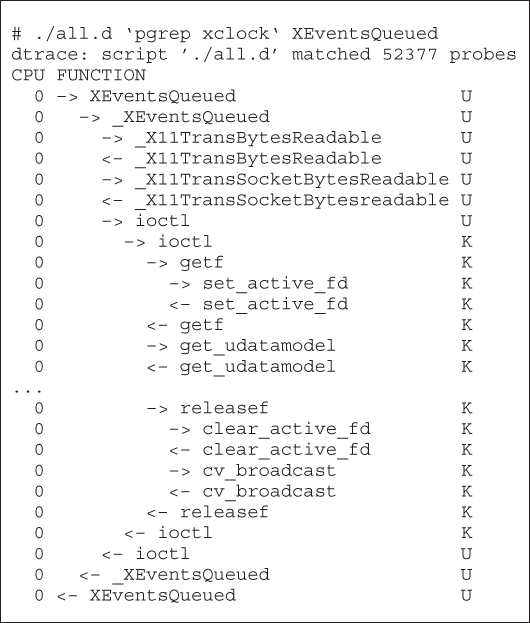
- Consider, for example, the trace of an ioctl system call as shown in Figure 2.22 below.
Figure 2.20 - Solaris 10 dtrace follows a system call within the kernel
- Probe code is restricted to be "safe", ( e.g. no loops allowed ), and to use a minimum of system resources.
- When a probe fires, enabling control blocks, ECBs, are performed, each having the structure of an if-then block
- When a consumer terminates, the ECBs associated with that consumer are removed. When no more ECBs remain interested in a particular probe, then that probe is also removed.
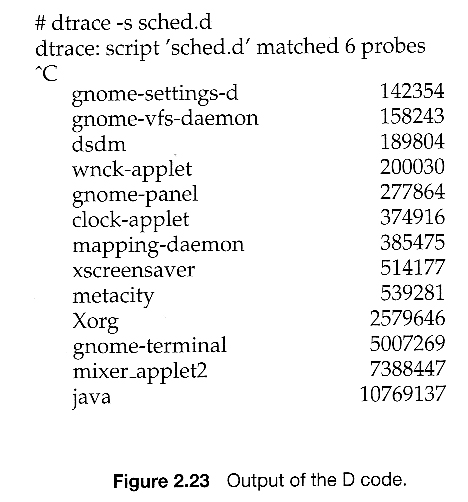
- For example, the following D code monitors the CPU time of each process running with user ID of 101. The output is shown in Figure 2.23 below.
sched:::on-cpu
uid == 101
{
self->ts = timestamp;}
sched:::off-cpu
self->ts
{
@time[execname] = sum( timestamp - self->ts );
self->ts = 0;}
Figure 2.21- Use of DTrace is restricted, due to the direct access to ( and ability to change ) critical kernel data structures.
- Because DTrace is open-source, it is being adopted by several UNIX distributions. Others are busy producing similar utilities.
The general approach when most computers boot up goes something like this:
- When the system powers up, an interrupt is generated which loads a memory address into the program counter, and the system begins executing instructions found at that address. This address points to the "bootstrap" program located in ROM chips ( or EPROM chips ) on the motherboard.
- The ROM bootstrap program first runs hardware checks, determining what physical resources are present and doing power-on self tests ( POST ) of all HW for which this is applicable. Some devices, such as controller cards may have their own on-board diagnostics, which are called by the ROM bootstrap program.
- The user generally has the option of pressing a special key during the POST process, which will launch the ROM BIOS configuration utility if pressed. This utility allows the user to specify and configure certain hardware parameters as where to look for an OS and whether or not to restrict access to the utility with a password.
- Some hardware may also provide access to additional configuration setup programs, such as for a RAID disk controller or some special graphics or networking cards.
- Assuming the utility has not been invoked, the bootstrap program then looks for a non-volatile storage device containing an OS. Depending on configuration, it may look for a floppy drive, CD ROM drive, or primary or secondary hard drives, in the order specified by the HW configuration utility.
- Assuming it goes to a hard drive, it will find the first sector on the hard drive and load up the fdisk table, which contains information about how the physical hard drive is divided up into logical partitions, where each partition starts and ends, and which partition is the "active" partition used for booting the system.
- There is also a very small amount of system code in the portion of the first disk block not occupied by the fdisk table. This bootstrap code is the first step that is not built into the hardware, i.e. the first part which might be in any way OS-specific. Generally this code knows just enough to access the hard drive, and to load and execute a ( slightly ) larger boot program.
- For a single-boot system, the boot program loaded off of the hard disk will then proceed to locate the kernel on the hard drive, load the kernel into memory, and then transfer control over to the kernel. There may be some opportunity to specify a particular kernel to be loaded at this stage, which may be useful if a new kernel has just been generated and doesn't work, or if the system has multiple kernels available with different configurations for different purposes. ( Some systems may boot different configurations automatically, depending on what hardware has been found in earlier steps. )
- For dual-boot or multiple-boot systems, the boot program will give the user an opportunity to specify a particular OS to load, with a default choice if the user does not pick a particular OS within a given time frame. The boot program then finds the boot loader for the chosen single-boot OS, and runs that program as described in the previous bullet point.
- Once the kernel is running, it may give the user the opportunity to enter into single-user mode, also known as maintenance mode. This mode launches very few if any system services, and does not enable any logins other than the primary log in on the console. This mode is used primarily for system maintenance and diagnostics.
- When the system enters full multi-user multi-tasking mode, it examines configuration files to determine which system services are to be started, and launches each of them in turn. It then spawns login programs ( gettys ) on each of the login devices which have been configured to enable user logins.
- ( The getty program initializes terminal I/O, issues the login prompt, accepts login names and passwords, and authenticates the user. If the user's password is authenticated, then the getty looks in system files to determine what shell is assigned to the user, and then "execs" ( becomes ) the user's shell. The shell program will look in system and user configuration files to initialize itself, and then issue prompts for user commands. Whenever the shell dies, either through logout or other means, then the system will issue a new getty for that terminal device. )

Figure 16.1 - System models. (a) Nonvirtual machine. (b)Virtual machine.
2.8.1 History
- Virtual machines first appeared as the VM Operating System for IBM mainframes in 1972.
2.8.2 Benefits
- Each OS runs independently of all the others, offering protection and security benefits.
- ( Sharing of physical resources is not commonly implemented, but may be done as if the virtual machines were networked together. )
- Virtual machines are a very useful tool for OS development, as they allow a user full access to and control over a virtual machine, without affecting other users operating the real machine.
- As mentioned before, this approach can also be useful for product development and testing of SW that must run on multiple OSes / HW platforms.
2.8.3 Simulation
- An alternative to creating an entire virtual machine is to simply run an emulator, which allows a program written for one OS to run on a different OS.
- For example, a UNIX machine may run a DOS emulator in order to run DOS programs, or vice-versa.
- Emulators tend to run considerably slower than the native OS, and are also generally less than perfect.
2.8.4 Para-virtualization
- Para-virtualization is another variation on the theme, in which an environment is provided for the guest program that is similar to its native OS, without trying to completely mimic it.
- Guest programs must also be modified to run on the para-virtual OS.
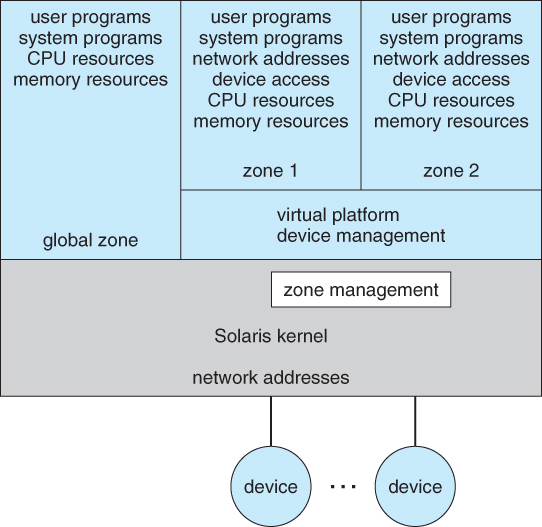
- Solaris 10 uses a zone system, in which the low-level hardware is not virtualized, but the OS and its devices ( device drivers ) are.
- Within a zone, processes have the view of an isolated system, in which only the processes and resources within that zone are seen to exist.
- Figure 2.18 shows a Solaris system with the normal "global" operating space as well as two additional zones running on a small virtualization layer.
Figure 16.7 - Solaris 10 with two zones.2.8.5 Implementation
- Implementation may be challenging, partially due to the consequences of user versus kernel mode.
- Each of the simultaneously running kernels needs to operate in kernel mode at some point, but the virtual machine actually runs in user mode.
- So the kernel mode has to be simulated for each of the loaded OSes, and kernel system calls passed through the virtual machine into a true kernel mode for eventual HW access.
- The virtual machines may run slower, due to the increased levels of code between applications and the HW, or they may run faster, due to the benefits of caching. ( And virtual devices may also be faster than real devices, such as RAM disks which are faster than physical disks. )
2.8.6 Examples
2.8.6.1 VMware
- Abstracts the 80x86 hardware platform, allowing simultaneous operation of multiple Windows and Linux OSes, as shown by example in Figure 2.19:
Figure 16.9 - VMWare Workstation architecture2.8.6.2 The Java Virtual Machine
- Java was designed from the beginning to be platform independent, by running Java only on a Java Virtual Machine, JVM, of which different implementations have been developed for numerous different underlying HW platforms.
- Java source code is compiled into Java byte code in .class files. Java byte code is binary instructions that will run on the JVM.
- The JVM implements memory management and garbage collection.
- Java byte code may be interpreted as it runs, or compiled to native system binary code using just-in-time ( JIT ) compilation. Under this scheme, the first time that a piece of Java byte code is encountered, it is compiled to the appropriate native machine binary code by the Java interpreter. This native binary code is then cached, so that the next time that piece of code is encountered it can be used directly.
- Some hardware chips have been developed to run Java byte code directly, which is an interesting application of a real machine being developed to emulate the services of a virtual one!
Figure 16.10 - The Java virtual machine
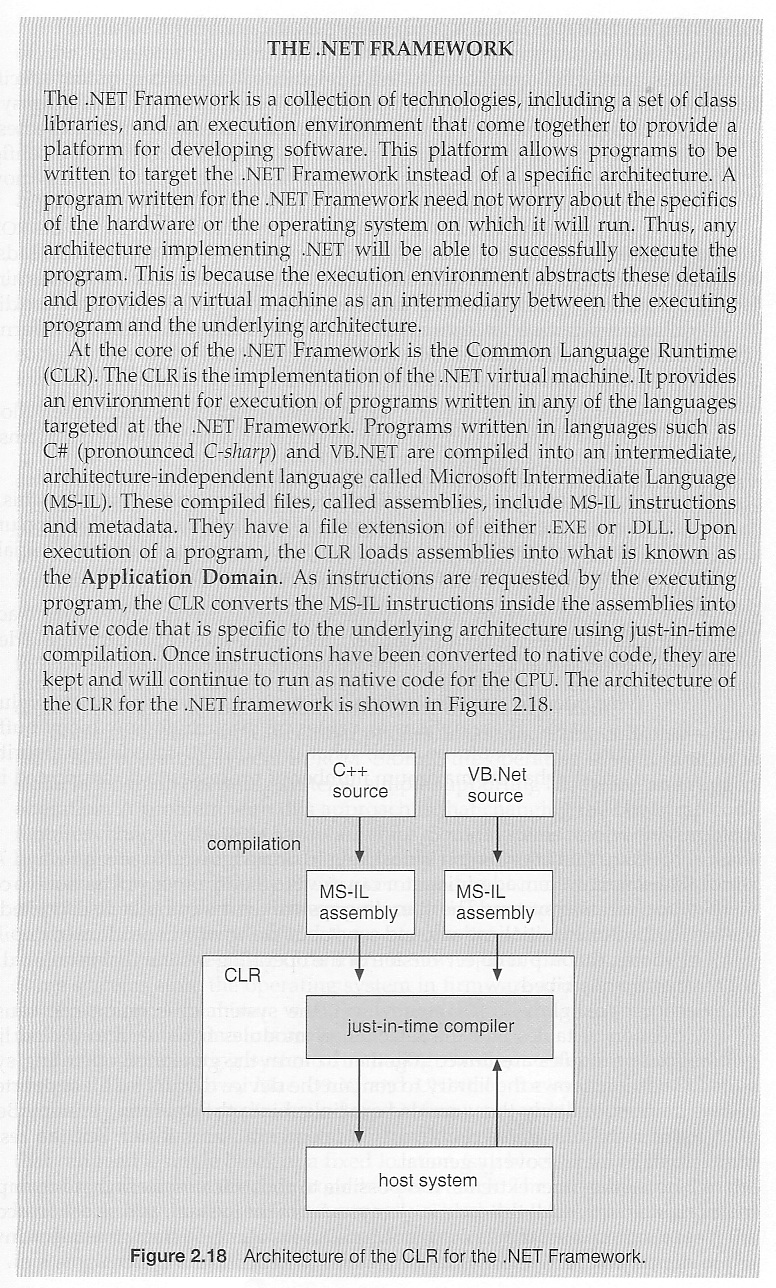
- The .NET framework also relies on the concept of compiling code for an intermediary virtual machine, ( Common Language Runtime, CLR ), and then using JIT compilation and caching to run the programs on specific hardware, as shown in Figure 2.21:
Figure 2.21