week 13 lab
Introduction to Wireshark#
Wireshark is a open-source
network protocol analyzer. It is extremely useful in debugging network traffic. Wireshark consists of
two parts: one is a packet capture engine powered by tcpdump, and the other is a powerful and expressive
packet parsing capability that understands hundreds of different network protocols. Download and install Wireshark.
TCP Packets Analysis in Wireshark#
Let's examine packets captured during TCP communication from this pcap file.
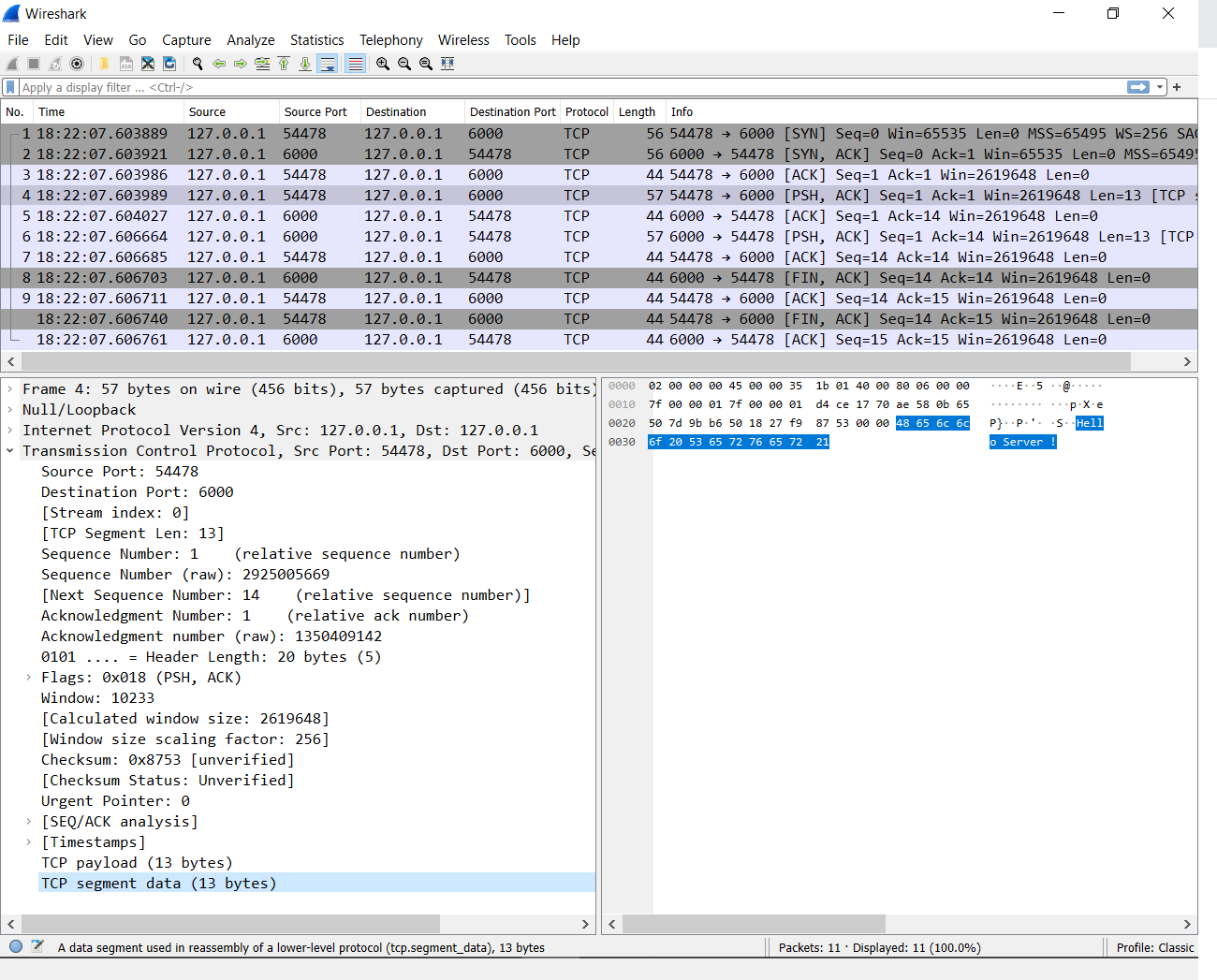
Here both server as well as client are running on localhost (i.e., 127.0.0.1). Server is using port 6000
and Client is using port 54478. After three way handshake, Client sends data to Server(Packet no. 4).
Server acknowledges and then replies back to the Client with some data(Packet no. 6). The Client
acknowledges this packet. Finally socket is closed from both sides.
Capture the Live Traffic#
- Python is pre-installed on most Linux distributions and MacOS. However, if Python is not installed, you can download and install it from here. Use the following python scripts for generating network traffic.
- Default port for TCP Server is set to
6000. We will be running our TCP Server over local interface with ip address127.0.0.1. Start the TCP Server using following command:
In order to capture the packets we must first select the interface(in our case loopback interface) on which communication is going on. From Menu bar select Capture->Options->Npcap Loopback Adapter. If interface is already selected then you can start capture directly by clicking on Start button which resembles the Blue colored shark fin.
Execute the TCP Client script using following command:
- After successful capture of the packets. Kill the server and stop the capture by clicking on Red colored Stop button next to Start button.
Additional Packets Analysis#
- Examine the HTTP transaction from this pcap file. Alternatively try to run the http server using following python script. Use browser as a client. Try to access http://127.0.0.1:7000/ from browser. Capture the packets using technique learnt from the previous excercise.
- Now let's examine this pcap file containing transactions with webchat server from homework5. Gradescope Questions will be based on it. In this scenario, three clients are communicating with each other using webchat server. Initially on connecting with webchat server each client sends message saying, "Hello, I am Client < 1/2/3>". Later while disconnecting each client sends message saying, "Bye, from Client <1/2/3>"
Tips and Tricks#
- While running program on remote system, GUI based Wireshark will not be available directly. Thus it
is recommended to use
tsharkortcpdumpto capture the packets and store them in pcap file on remote system. This file can be later analyzed with Wireshark. You can installtsharkon Linux usingsudo apt-get update && sudo apt-get install tshark -y. Similar to Pythontcpdumpis pre-installed with most Linux distributions and MacOS. Please note that installing programs and capturing traffic require admin privilege which is not available on SystemsX. The following commands telltsharkandtcpdumpto capture traffic on a specific interface:
- Filters are valuable features of Wireshark. Simply Right Click on any field within Packet Details
Pane and select Apply as Filter. Now only packets satisfying filters will be displayed. For instance,
using the following filter will display packets with
tcpport1234, and source and destination IP address1.2.3.3and1.2.3.4.
- Many times you might face the issue of "Port Already in use" even though program seems terminated. In this case find pid associated with that port using netstat and kill the program using acquired pid.
Note: If you are using systemsX machines for these experiments then use the port assigned to you from homework5.
Answer the Gradescope Quiz based on your learning.
Peer evaluation rubric#
You can find your pairings for the lab in this sheet. Please grade your peers out of 1 point using this form.
| Session | Task | Points |
|---|---|---|
| Session A | Discuss questions 1, 2, and 3 | 1 point |
| Session B | Discuss questions 4 and 5 | 1 point |
Total grade calculation#
| Task | Points |
|---|---|
| Turn in the Gradescope assignment | 6 points |
| Discuss your answers | 1 point |
| Evaluate another student | 1 point |
| Total points | 8 points |